

Most companies believe they’ve adopted AI because their tools added new features. Real adoption looks very different — and it changes how work actually happens.
I was talking with a marketing manager recently who proudly told me:
“We’ve adopted AI across the company.”
Naturally, I asked what that looked like.
They explained they were using Performance Max’s AI features in Google Ads. Gemini inside spreadsheets. A Zoom add-on that writes meeting notes automatically.
And look — those tools are useful. I use some of them too.
But here’s the uncomfortable truth:
That’s not AI adoption.
That’s software companies adding new features to tools you were already using — and calling it transformation.
And confusing the two is exactly why so many businesses believe they’re moving forward with AI… while their day-to-day work hasn’t actually changed.
Key Takeaways
Quick wins
- AI features inside software are not the same as AI adoption.
- Real adoption connects workflows and automates processes.
- Businesses should start with repeatable tasks.
- AI maturity progresses from Features → Workflows → Capability.
The Great AI Illusion
Right now, almost every platform has added an “AI” button somewhere:
- Google Analytics offers AI-generated insights summaries
- Performance Max automatically optimizes campaign delivery
- Gemini lives inside Docs and Sheets waiting to rewrite text or build formulas
- Zoom add-ons summarize meetings and create action items
- CRMs draft responses and suggest follow-ups
These tools are helpful. They remove friction in small moments.
But they don’t fundamentally change how work happens.
Here’s what usually still looks the same inside organizations:
- Marketing managers still gather inputs manually
- Teams still copy and paste between platforms
- Campaigns still start from scratch each time
- Content still requires multiple people repeating the same steps
The workflow hasn’t evolved — only the interface has.
You didn’t redesign operations.
You upgraded convenience.
It’s the difference between installing a faster keyboard… and hiring an assistant.
Why This Matters More Than People Realize
Businesses think AI adoption means using smarter software.
Real adoption means changing how work flows through the business.
If AI only helps one person complete one task slightly faster, productivity improves marginally.
But if AI connects steps together and executes processes automatically, productivity compounds.
That’s the gap most companies haven’t crossed yet.
They’re optimizing tasks.
They’re not redesigning systems.
“Using AI inside a tool isn’t adoption. It’s convenience.”
What Real AI Adoption Actually Looks Like
Real AI adoption begins when AI stops acting like a helper and starts acting like a participant inside workflows.
Instead of asking AI for output, you design systems where AI:
- receives inputs automatically
- makes decisions based on context
- creates assets or actions
- sends results to the next step without human intervention
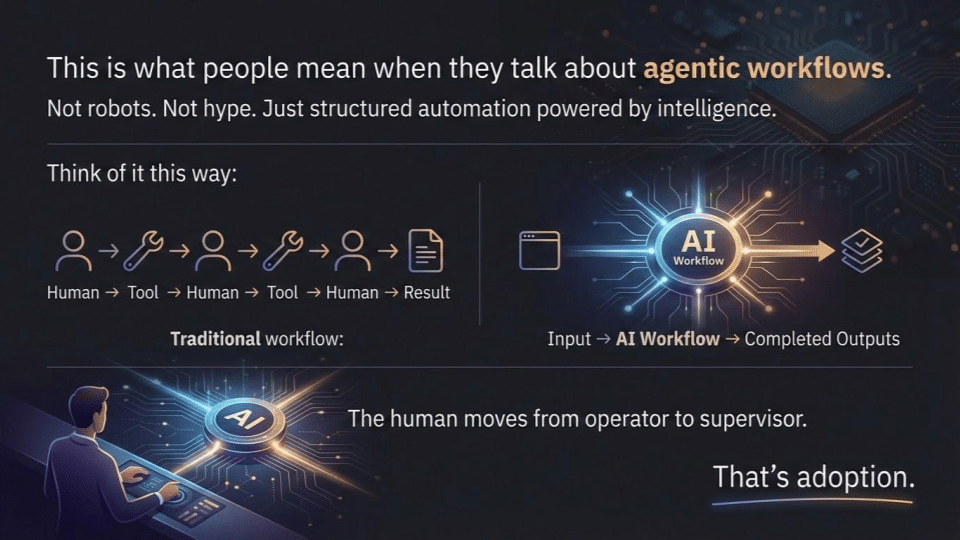
This is what people mean when they talk about agentic workflows.
Not robots. Not hype.
Just structured automation powered by intelligence.
Think of it this way:
Traditional workflow:
Human → Tool → Human → Tool → Human → Result
AI-enabled workflow:
Input → AI Workflow → Completed Outputs
The human moves from operator to supervisor.
That’s adoption.
The Moment It Clicked (A 90-Second Agent)
During a recent session, I built a simple AI agent live in front of an audience.
No developers. No complex setup.
Here’s what happened.
I uploaded a single image — a promotional flyer for an event. The kind of asset businesses create every day.
Normally, that flyer would trigger hours of work:
- Someone writes social captions
- Someone drafts an email
- Someone plans blog content
- Someone adapts messaging per platform


Instead, the agent handled it.
From that one input, it automatically:
✅ Generated 10 social media posts tailored to different platforms
Each post adjusted tone, length, and structure depending on where it would appear — LinkedIn, Instagram, Facebook, etc.
✅ Created a structured blog post outline
Not generic fluff — a usable framework aligned with the topic so a marketer could immediately begin writing.
✅ Drafted an email campaign
Subject line, body copy, and call-to-action ready for refinement and sending.
Total build time: about 90 seconds.
The reaction in the room changed instantly.
Because people weren’t seeing AI assist creativity.
They were watching AI execute a workflow.
That’s when the questions shifted from:
“What tool is this?”
to
“How do I build this into my business?”
“People stopped asking what button to click and started asking how to build systems.”
Add-Ons vs Adoption (The Simple Test)
If you’re unsure where your organization sits, try this quick test.
AI Add-On
- Lives inside one application
- Requires manual prompting every time
- Improves speed slightly
- Helps individuals
Example:
You click “Generate Summary” after every meeting.
Useful — but nothing changes structurally.
AI Adoption
- Connects multiple systems together
- Triggers automatically from events
- Produces multiple outputs at once
- Improves organizational efficiency
Example:
Meeting ends → transcript processed → tasks created → CRM updated → follow-up email drafted automatically.
No extra clicks required.
If AI disappeared tomorrow and your processes wouldn’t break…
You haven’t embedded AI yet.
Where Businesses Should Actually Start
Most companies hear “AI adoption” and immediately think they need a massive transformation plan, new hires, or expensive software.
You don’t.
Real adoption starts somewhere much simpler:
Find the work your team repeats every week — and stop rebuilding it from scratch every time.
AI delivers the biggest return when it removes repetition, not when it replaces creativity.
Here are three places almost every business should start.
1. Build a Content Production Agent
What This Actually Means
Most marketing teams create content the hard way.
An event announcement, webinar, promotion, or new product launches — and suddenly someone has to create:
- Instagram captions
- LinkedIn posts
- Facebook updates
- Email campaigns
- Blog content
- Website copy
Same message. Different formats. Rebuilt over and over again.
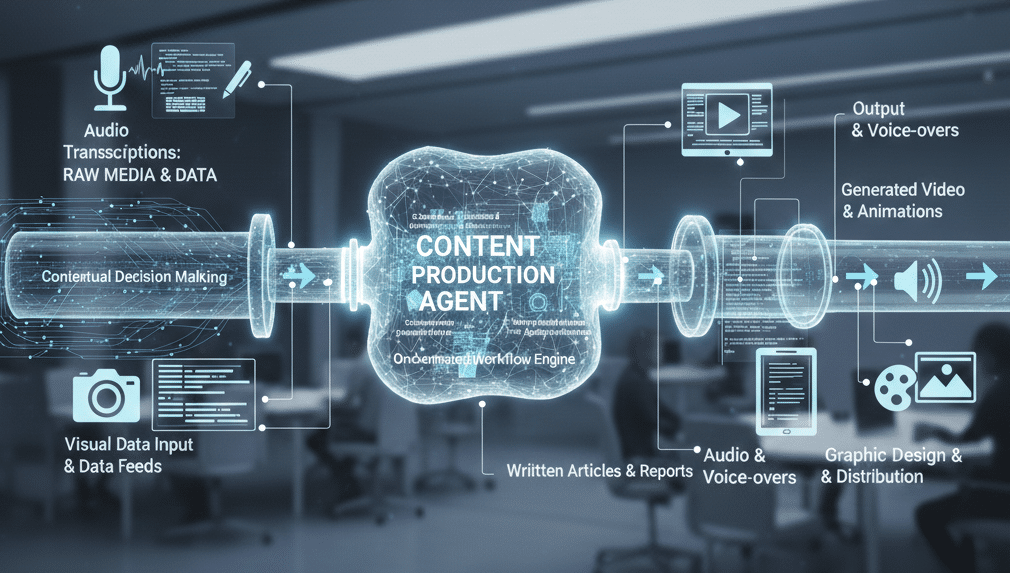
A content production agent changes the workflow completely.
Instead of creating each piece individually, you:
- Input one source asset (flyer, transcript, outline, or idea)
- AI extracts key messaging automatically
- The workflow generates platform-specific drafts
- Content is ready for review instead of starting from zero
One input → multiple usable outputs.
Your team edits and approves rather than creates from scratch.
Why You Need This
Because content demand is increasing faster than teams can scale.
Marketing expectations today require:
- more channels
- faster publishing
- consistent messaging
- constant visibility
Without automation, teams hit a ceiling where output depends entirely on available hours.
AI workflows break that ceiling by multiplying effort without multiplying headcount.
What Happens If You Don’t
If you keep producing content manually:
- Your competitors publish more frequently.
- Campaigns take longer to launch.
- Messaging becomes inconsistent across platforms.
- Your team burns time on formatting instead of strategy.
Eventually, businesses that automate content workflows simply outpace those that don’t — not because they’re smarter, but because their systems move faster.
2. Automate Administrative Workflows
What This Actually Means
Administrative work quietly consumes a massive portion of business time.
After every meeting, form submission, or customer interaction, someone usually has to:
- review notes
- create tasks
- assign responsibilities
- Update the CRM
- draft follow-up emails
- move information between systems
None of this work creates new value — it just keeps operations moving.
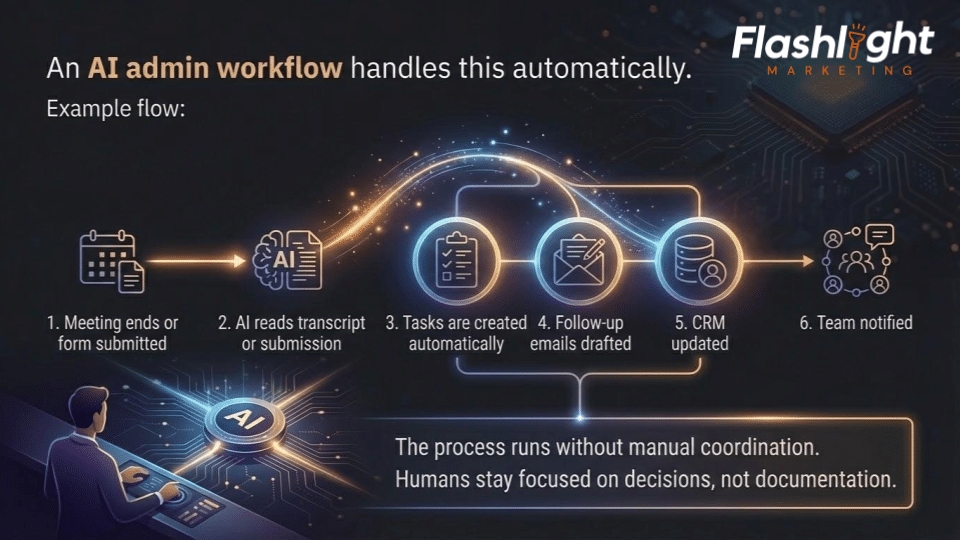
An AI admin workflow handles this automatically.
Example flow:
- Meeting ends or form submitted
- AI reads transcript or submission
- Tasks are created automatically
- Follow-up emails drafted
- CRM updated
- Team notified
The process runs without manual coordination.
Humans stay focused on decisions, not documentation.
Why You Need This
Admin friction is one of the biggest hidden productivity killers in organizations.
Every manual handoff introduces:
- delays
- missed information
- inconsistent follow-up
- dependency on specific individuals
Automation creates operational consistency. Work moves forward even when people are busy.
That reliability compounds over time.
What Happens If You Don’t
Without automation:
- Follow-ups get delayed or forgotten.
- Opportunities slip through cracks.
- Staff spend hours on coordination instead of growth work.
- Scaling requires hiring more administrative support.
Businesses often think they need more people when what they actually need is fewer manual steps.
3. Create Marketing Workflow Automation
What This Actually Means
Marketing execution today usually looks like controlled chaos.
A campaign starts and suddenly involves:
- messaging development
- asset creation
- approvals
- scheduling
- platform uploads
- reporting setup
Each step depends on someone remembering what happens next.
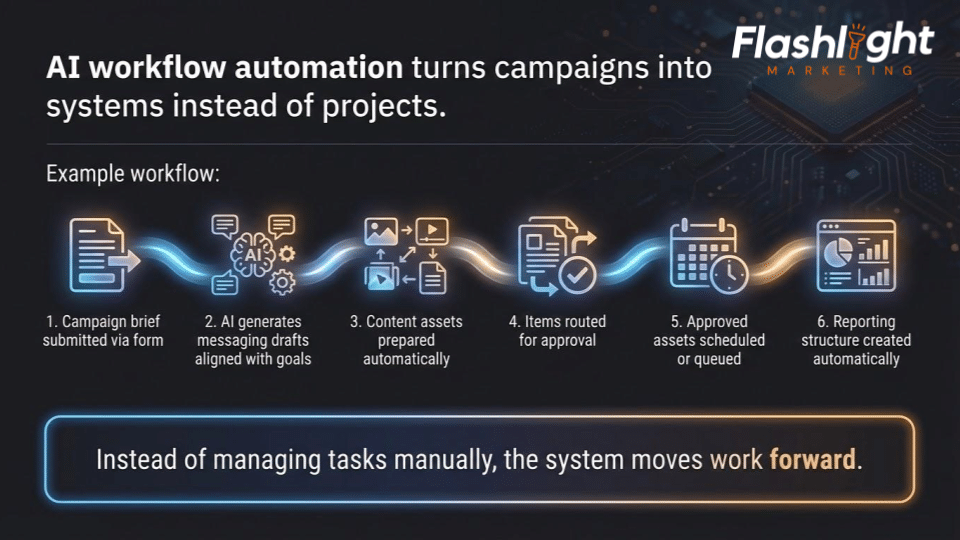
AI workflow automation turns campaigns into systems instead of projects.
Example workflow:
- Campaign brief submitted via form
- AI generates messaging drafts aligned with goals
- Content assets prepared automatically
- Items routed for approval
- Approved assets scheduled or queued
- Reporting structure created automatically
Instead of managing tasks manually, the system moves work forward.
Why You Need This
Speed is now a competitive advantage.
The businesses winning today aren’t necessarily producing better ideas — they’re executing faster and more consistently.
Workflow automation reduces:
- launch delays
- internal bottlenecks
- communication breakdowns
- dependency on individual memor
Marketing becomes predictable and repeatable.
What Happens If You Don’t
If workflows stay manual:
- Campaigns take weeks instead of days.
- Opportunities are missed because execution lags.
- Teams feel constantly behind.
- Growth becomes limited by coordination capacity.
Meanwhile, competitors using AI workflows test more ideas, learn faster, and improve performance continuously.
Over time, execution speed becomes market advantage.
The Bigger Picture
Notice something about all three starting points?
None requires replacing your team.
They remove the friction around your team.
That’s the real promise of AI adoption:
Not doing different work.
Doing the same valuable work — without the repetitive drag that slows everything down.
The Mindset Shift Most Companies Miss
AI adoption isn’t primarily technical.
It’s philosophical.
Most businesses ask:
“How can AI help my team work faster?”
But high-performing organizations ask:
“Which parts of work should no longer require human effort at all?”
That single question reframes everything.
Because productivity breakthroughs don’t come from faster typing.
They come from eliminating unnecessary repetition.
The Good News (This Isn’t Hard)
Here’s what surprises people most:
You don’t need to be technical.
You don’t need engineers.
You don’t need to rebuild your company.
Modern automation platforms and AI tools allow non-developers to design workflows visually.
Start small:
- Choose one repetitive process
- Build one automation
- Save one hour per week
Then repeat.
Small workflow improvements compound quickly — and within months, teams often reclaim dozens of hours.
That’s when AI stops feeling experimental and starts feeling essential.
Stop Clicking. Start Building.
AI buttons are fine.
Use them.
But don’t mistake convenience for transformation.
Real AI adoption begins when you stop asking:
“What feature should we try?”
and start asking:
“What work should happen automatically from now on?”
Because once AI begins working inside your business instead of sitting inside your software…
You don’t just move faster.
You operate differently.
And that’s where real competitive advantage begins.
The 3 Stages of AI Maturity
(Where Most Businesses Think They Are vs. Where They Actually Are)
One of the biggest problems in the AI conversation right now is that everyone is using the same words to describe completely different levels of adoption.
A company clicking an AI button believes they’re “doing AI.”
A company running automated workflows also says they’re “doing AI.”
Technically, both are true — but operationally, they are worlds apart.
Most organizations move through three clear stages of AI maturity.
Stage 1: Buttons
↓
Stage 2: Workflows
↓
Stage 3: Capability
Understanding where you are is the first step toward moving forward.
“AI maturity isn’t about tools. It’s about how work moves.”
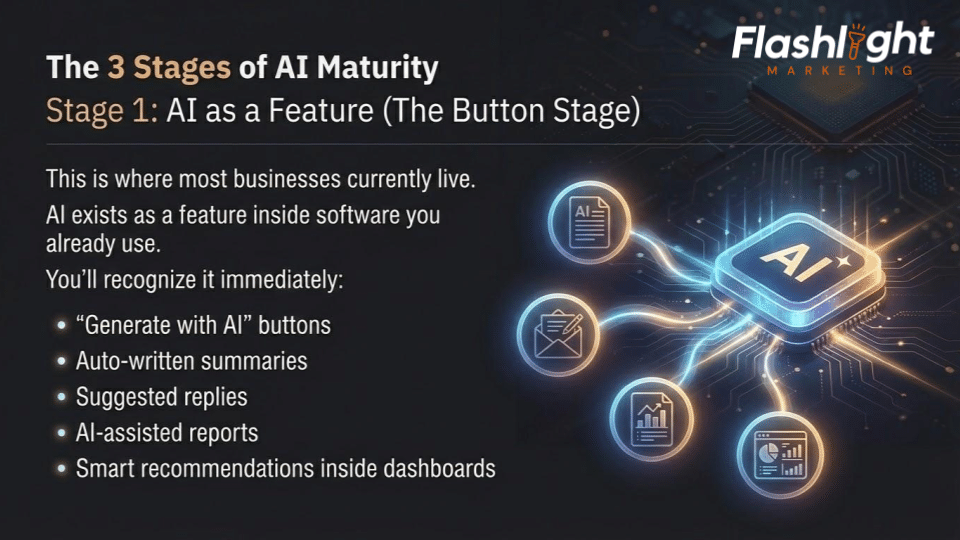
Stage 1: AI as a Feature (The Button Stage)
This is where most businesses currently live.
AI exists as a feature inside software you already use.
You’ll recognize it immediately:
- “Generate with AI” buttons
- Auto-written summaries
- Suggested replies
- AI-assisted reports
- Smart recommendations inside dashboards
The workflow still looks like this:
Human decides → Human clicks → AI assists → Human continues working.
AI helps individuals complete tasks faster, but nothing fundamentally changes about how work moves through the organization.
The Benefit
You save small amounts of time and reduce friction in individual tasks.
This stage is useful — and it’s often the gateway into AI awareness.
The Limitation
Every action still depends on a human initiating the next step.
AI is reactive, not operational.
If your team stops clicking buttons, productivity stops improving.
The Hidden Risk
Companies often stop here because it feels like progress.
But competitors who move beyond this stage begin compounding efficiency gains while you remain incrementally faster — not fundamentally better.
Stage 2: AI as a Workflow (The System Stage)
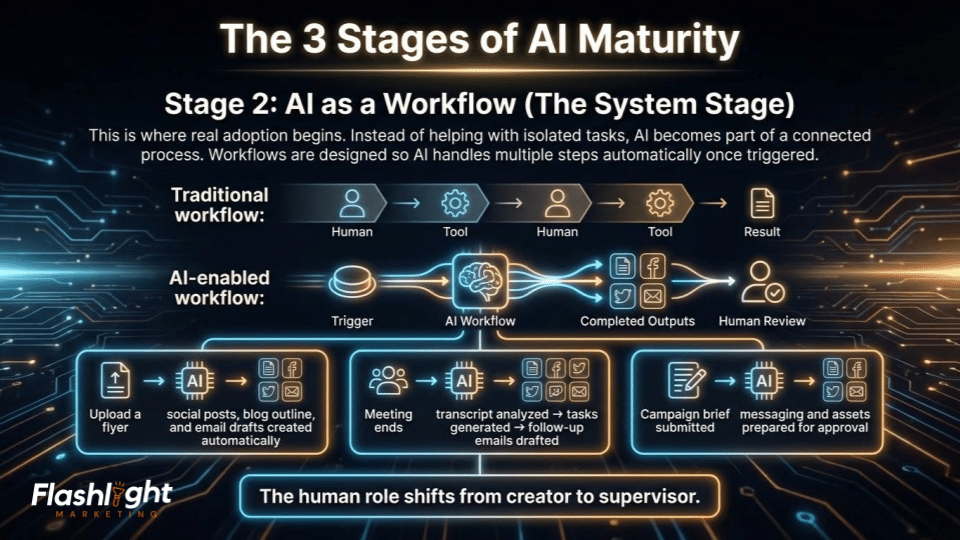
This is where real adoption begins.
Instead of helping with isolated tasks, AI becomes part of a connected process.
Workflows are designed so AI handles multiple steps automatically once triggered.
The workflow changes from:
Human → Tool → Human → Tool → Result
to:
Trigger → AI Workflow → Completed Outputs → Human Review
Examples include:
- Upload a flyer → social posts, blog outline, and email drafts created automatically
- Meeting ends → transcript analyzed → tasks generated → follow-up emails drafted
- Campaign brief submitted → messaging and assets prepared for approval
The human role shifts from creator to supervisor.
The Benefit
Time savings multiply instead of adding up slowly.
One action now produces multiple outcomes.
Consistency improves because processes run the same way every time.
Why This Stage Matters
This is where organizations begin reclaiming hours — sometimes entire days — every week.
Teams stop spending energy on coordination and start focusing on strategy and creativity.
The Competitive Impact
Businesses operating at this stage execute faster, publish more consistently, and respond to opportunities sooner.
Speed becomes an advantage.
Stage 3: AI as a Capability (The Autonomous Stage)
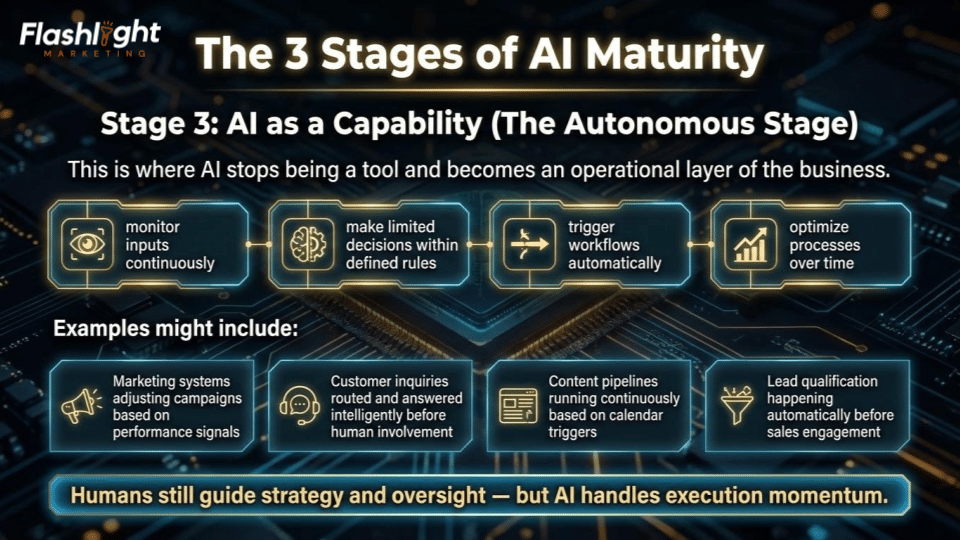
This is where AI stops being a tool and becomes an operational layer of the business.
At this stage, AI systems:
- monitor inputs continuously
- make limited decisions within defined rules
- trigger workflows automatically
- optimize processes over time
Examples might include:
- Marketing systems adjusting campaigns based on performance signals
- Customer inquiries routed and answered intelligently before human involvement
- Content pipelines running continuously based on calendar triggers
- Lead qualification happening automatically before sales engagement
Humans still guide strategy and oversight — but AI handles execution momentum.
The Benefit
Work scales without proportional increases in staffing or complexity.
The organization becomes more adaptive and responsive.
The Reality Check
Very few businesses are fully here yet — and that’s okay.
You don’t jump to Stage 3 overnight.
You arrive there by building workflows first.
Why Most Businesses Get Stuck
Companies try to leap from Stage 1 directly to Stage 3.
They hear terms like “AI agents” or “autonomous systems” and assume transformation requires massive change.
So they stall.
But maturity doesn’t happen through a giant leap.
It happens through small workflow wins repeated over time.
Buttons → Workflows → Capability.
That’s the path.
The Question Every Leader Should Ask about AI
Instead of asking:
“Are we using AI?”
Ask:
“Which stage are we operating in — and what’s our next step forward?”
Because AI maturity isn’t about tools.
It’s about how intelligently work moves through your business.
And the organizations that understand this early won’t just adopt AI faster.
They’ll operate on an entirely different curve.
The Businesses That Win the Next Five Years Won’t Be the Ones Using AI the Most
They’ll be the ones who redesign how work happens.
Right now, we’re in a strange moment.
Every company is talking about AI.
Every platform is announcing AI features.
Every team is experimenting with prompts and summaries and smart assistants.
And for many organizations, it feels like progress.
But history tells us something important:
Technology advantages rarely come from using new tools first.
They come from changing systems first.
The companies that benefited most from the internet weren’t the ones who built websites earliest — they were the ones who redesigned operations around digital workflows.
The same thing is happening again.
The AI Divide Is Already Forming
Over the next few years, businesses will quietly separate into two groups.
Group One:
Teams that use AI occasionally.
They’ll generate drafts faster. Write emails quicker. Produce reports with fewer clicks.
They’ll be more efficient than before — but still limited by human bandwidth.
Group Two:
Teams that build AI into how work moves.
Their marketing runs through workflows.
Their admin processes happen automatically.
Their content pipelines scale without adding headcount.
Their teams spend more time deciding and less time assembling.
They won’t look dramatically different day to day.
They’ll just move faster — consistently.
And consistency compounds.
This Isn’t About Replacing People
The biggest misconception about AI adoption is fear.
People assume automation removes human value.
In reality, it removes human friction.
The best teams aren’t becoming smaller.
They’re becoming more focused.
Less time copying information.
Less time restarting repetitive work.
Less time coordinating between tools.
More time thinking, improving, and building.
AI doesn’t replace expertise.
It amplifies it.
The Quiet Competitive Advantage
Here’s what most businesses won’t notice until it’s too late:
AI adoption doesn’t create one big breakthrough moment.
It creates dozens of small advantages:
- campaigns launch a little faster
- follow-ups happen more reliably
- content appears more consistently
- opportunities get acted on sooner
Individually, these changes feel small.
Together, they reshape momentum.
And momentum is incredibly hard to compete against.
So Where Should You Go From Here?
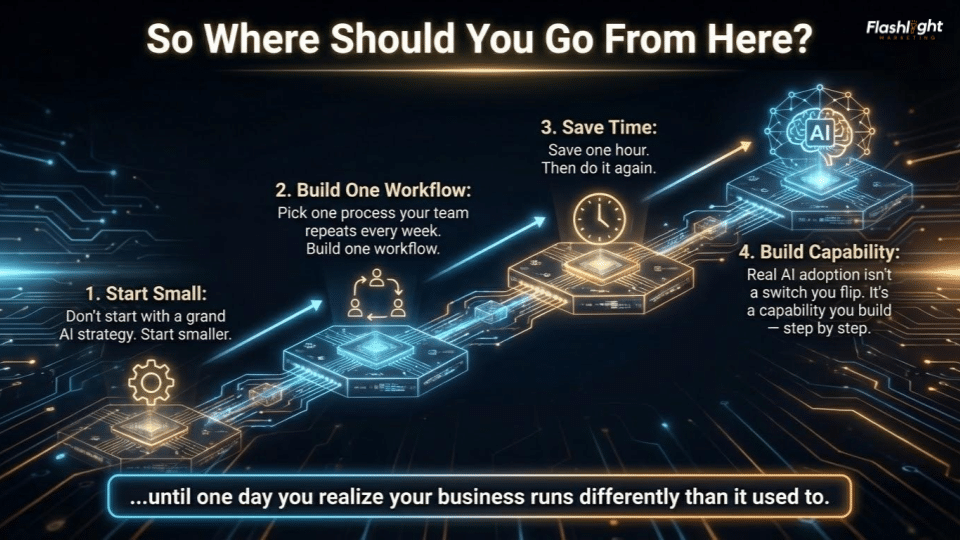
Don’t start with a grand AI strategy.
Start smaller.
Pick one process your team repeats every week.
Build one workflow.
Save one hour.
Then do it again.
Real AI adoption isn’t a switch you flip.
It’s a capability you build — step by step — until one day you realize your business runs differently than it used to.
“The future belongs to businesses building smarter systems, not buying smarter software.”
One Final Thought
If AI disappeared tomorrow, would your business slow down?
If the answer is no, you’re still experimenting.
If the answer is yes, you’ve started adopting.
And the sooner AI becomes part of how work happens — not just a feature you click — the sooner your organization moves from keeping up…
to pulling ahead.
At Flashlight Marketing, we spend less time asking what AI can write — and more time designing how AI can work.
Because the future doesn’t belong to businesses using smarter tools.
It belongs to businesses building smarter systems.